
PROJECT 01 / Human Factors
Power Wheelchair Laptop Mount.
Designing and prototyping a secure, adjustable laptop mounting system around the real-world needs of a power wheelchair user.
Understand → Requirements → Mechanical Design → Fabricate → Validate → Iterate
- YEAR
- 2026
- CONTEXT
- ME 141 · Assistive Design
- TEAM
- 4-person design team
- MY ROLE
- User & Product Research · Requirements Development · Prototyping · Fabrication · Design Iteration
The Challenge
Using a laptop away from home was difficult because typical tables rarely positioned the screen at the correct height or distance for comfortable use. Temporary solutions such as stacked boxes were unstable, inconvenient, and restricted normal movement.
Our team set out to create a laptop mounting system that could integrate with the wheelchair's existing equipment while remaining secure, adjustable, portable, and easy to remove.
DESIGN QUESTIONHow might we create a stable laptop setup without adding another complicated system to the wheelchair?
Unstable · poorly positioned
Stable · adjustable · removable
Understanding the User
Early conversations focused on how the laptop was currently used, how other assistive technology was mounted to the wheelchair, and what would make a new system practical during travel.
Several needs quickly became clear.
- Position the laptop closer than a typical table allows
- Allow adjustable positioning
- Avoid interfering with charging or existing equipment
- Make attachment and removal simple
- Keep the system compact enough for travel
- Prioritize stability and safety
KEY INSIGHTRather than adding an entirely separate mounting system, we could take advantage of hardware the user already knew how to use.
From User Needs to Engineering Requirements
User need
The laptop must feel stable and secure.
Engineering requirement
Support 6 lb without structural failure or permanent deformation.
User need
The system must be easy to swap with existing equipment.
Engineering requirement
Securely attach to the existing mounting slot in ≤10 seconds without tools.
User need
The laptop cannot slip or fall during use.
Engineering requirement
Use physical supports and a retention strap to keep the laptop secured under forward loading.
Adjustable · Durable · Portable · Charging Access Maintained
Exploring Concepts
We considered several ways to integrate the laptop mount with the wheelchair before selecting the existing mounting interface as the most practical direction.
Allow the laptop system to replace the existing mounted device when needed.
Add the laptop system through the current supporting structure.
Introduce an additional mounting point directly on the wheelchair.
DECISIONThe existing mounting slot became the preferred direction because it used an interface already incorporated into the wheelchair, avoided unnecessary permanent modifications, and allowed the systems to be swapped as needed.
Building on Existing Hardware
Not every component needed to be designed from scratch. We identified an adjustable commercial laptop stand that already provided much of the positioning functionality we needed and paired it with the wheelchair's existing mounting hardware.
This allowed our engineering effort to focus on the part unique to this project: the mechanical interface connecting the two systems.
Designing the Connection
The selected concept required a custom mechanical interface between the adjustable laptop stand and the wheelchair's existing mounting system.
We developed custom connector geometry in CAD so the component could interface with the existing hardware while providing a rigid connection for the laptop support.
Fabrication + Iteration
The connection geometry went through multiple fabrication attempts before reaching the final configuration.
An early steel component was waterjet cut and manually bent, but achieving a consistent bend was difficult. A later prototype was cut and formed using more controlled shop processes, allowing us to refine the geometry and evaluate how the component interacted with the existing mounting system.
DESIGN PRIORITYStructural stability and reliable attachment came before cosmetic refinement.
Final Prototype
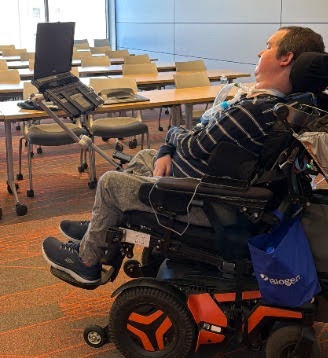
The final system uses the wheelchair's existing mounting interface, allowing the laptop setup to be installed without permanently modifying the chair.
The system combines an adjustable commercial laptop stand with our custom-fabricated mechanical connection. The final design provides a stable laptop platform while maintaining adjustability and compatibility with the existing wheelchair setup.
- Existing mounting interface
- Custom fabricated connector
- Adjustable laptop positioning
- Physical laptop supports
- Retention system
- Protective contact surfaces
- Removable configuration
Designing for Safety
Because the laptop is positioned directly in front of the user, preventing unwanted movement was a critical design consideration.
Risk
The laptop could shift or slide during use.
Design response
Raised physical supports, friction at contact surfaces, and a retention strap.
Risk
Movement at the connection could reduce confidence in the system.
Design response
Rigid fabricated interface and secure engagement with the existing mounting system.
Risk
A heavy or difficult-to-install system could place unnecessary stress on existing equipment.
Design response
Controlled loading, component selection, and a removable interface.
Validation Approach
We developed the prototype evaluation around three primary questions.
Can the system be attached, removed, and adjusted efficiently by someone who regularly handles the equipment?
Can a laptop remain secured when external forces are applied to the mount?
Can the laptop be positioned at an appropriate angle and distance for comfortable use?
LIMITATIONThe prototype was successfully integrated with the wheelchair, but the shortened development timeline limited the amount of long-term and dynamic-load testing that could be completed.
The Final System
The final prototype transformed a temporary laptop setup into a dedicated mounting solution built around hardware already familiar to the user.
Instead of treating accessibility as an additional feature, the design process began with the user's routines, equipment, and environment and used those constraints to drive the mechanical solution.
What I Learned
This project showed me how closely mechanical design decisions are tied to the context in which a product will actually be used. A mounting solution could be structurally strong and still fail if it was difficult to remove, interfered with existing equipment, or made travel more complicated.
One of our biggest design challenges was balancing rigidity with easy removal. Working directly with the user and caregiver helped us prioritize what mattered most and pushed us toward a solution that reused a familiar mounting interface rather than adding unnecessary complexity.
With more development time, I would complete additional durability and dynamic-load testing, reduce the visual bulk of the custom connection, and continue refining the attachment process.